AI coding assistants are changing how developers write software. From generating code snippets to debugging applications and improving productivity, AI tools are becoming essential for modern programming workflows.
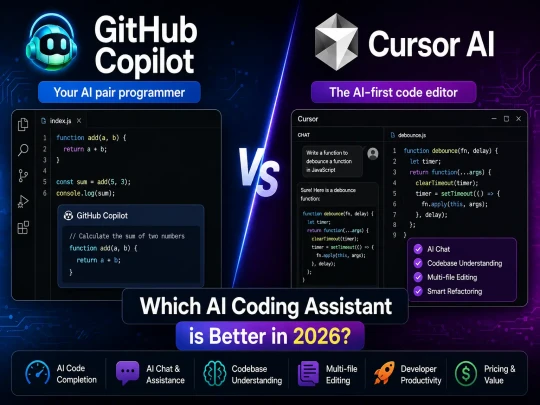
Two of the most popular AI coding assistants today are GitHub Copilot and Cursor AI. Both platforms help developers write code faster, but they approach AI-assisted development differently.
In this comparison guide, we will analyze:
- Features and capabilities
- Code quality and accuracy
- Pricing and plans
- AI chat functionality
- Productivity improvements
- Best use cases for developers
Table of Contents
What is GitHub Copilot?
GitHub Copilot is an AI-powered coding assistant developed by GitHub and OpenAI. It integrates directly into editors like VS Code and helps developers write code using intelligent autocomplete suggestions.
GitHub Copilot can:
- Generate code snippets
- Autocomplete functions
- Suggest algorithms
- Write repetitive code
- Assist with debugging
- Explain existing code
Its biggest advantage is simplicity. Developers can continue using their favorite IDE while adding AI-powered assistance directly into their workflow.
What is Cursor AI?
Cursor AI is an AI-first code editor designed specifically for modern AI-assisted development. Unlike GitHub Copilot, Cursor is a complete coding environment built around AI workflows.
Cursor AI focuses heavily on:
- AI chat integration
- Context-aware coding
- Multi-file understanding
- Codebase analysis
- Refactoring support
- AI-driven development workflows
Cursor AI has become extremely popular among developers working on large applications and AI-heavy projects because of its advanced project understanding.
GitHub Copilot vs Cursor AI: Feature Comparison
| Feature | GitHub Copilot | Cursor AI |
|---|---|---|
| AI Code Completion | Excellent | Excellent |
| AI Chat | Basic | Advanced |
| Codebase Understanding | Limited | Strong |
| Multi-file Editing | No | Yes |
| Refactoring Support | Moderate | Advanced |
| Ease of Use | Very Easy | Medium Learning Curve |
| Editor Integration | VS Code + Others | Built-in AI Editor |
| Best For | Quick AI Coding | AI-first Development |
Pricing Comparison
| Pricing Feature | GitHub Copilot | Cursor AI |
|---|---|---|
| Free Version | Limited | Available |
| Paid Plans | Affordable | Slightly Higher |
| Enterprise Features | Strong | Growing |
GitHub Copilot is generally more affordable for individual developers and beginners. Cursor AI, however, provides more advanced AI-powered workflows that many professional developers find valuable.
Performance & Productivity
GitHub Copilot Performance
GitHub Copilot works best for developers who need fast code suggestions directly inside their existing workflow.
It performs extremely well for:
- autocomplete coding
- boilerplate generation
- simple scripting
- frontend development
- backend API development
Because Copilot integrates directly into editors like VS Code, developers can start using it almost instantly.
Cursor AI Performance
Cursor AI focuses more on advanced AI-assisted development. It understands large codebases much better and supports multi-file editing workflows.
Cursor AI is especially useful for:
- large projects
- complex applications
- AI workflow automation
- code refactoring
- team collaboration
Its context awareness gives developers a major productivity advantage when working on enterprise-level projects.
Pros and Cons
GitHub Copilot Pros
- Easy setup process
- Excellent autocomplete suggestions
- Strong VS Code integration
- Affordable pricing
- Beginner-friendly experience
GitHub Copilot Cons
- Limited project understanding
- Basic AI chat functionality
- No advanced multi-file workflows
Cursor AI Pros
- Advanced AI coding workflows
- Strong project-wide understanding
- Excellent AI chat capabilities
- Powerful refactoring tools
- Better support for large applications
Cursor AI Cons
- Higher learning curve
- More expensive for some developers
- Requires workflow adjustments
Which AI Coding Assistant Should You Choose?
Choose GitHub Copilot If:
- You want simple AI coding assistance
- You already use VS Code
- You prefer lightweight AI integration
- You are a beginner developer
- You mainly need autocomplete suggestions
Choose Cursor AI If:
- You work on large projects
- You want AI-first workflows
- You need deep codebase understanding
- You want advanced AI chat features
- You frequently refactor large applications
Many professional developers are now switching toward Cursor AI because it offers a more advanced AI-assisted development environment.
Frequently Asked Questions
Is Cursor AI better than GitHub Copilot?
Cursor AI is generally better for advanced AI workflows and large codebases, while GitHub Copilot is better for lightweight autocomplete coding assistance.
Can beginners use Cursor AI?
Yes, but GitHub Copilot is usually easier for beginners because it integrates directly into familiar editors like VS Code.
Does Cursor AI support AI chat?
Yes, Cursor AI includes advanced AI chat functionality that helps developers understand and modify codebases more efficiently.
Which AI coding tool improves productivity more?
Cursor AI often provides better productivity improvements for complex projects, while GitHub Copilot is excellent for fast day-to-day coding tasks.
Final Verdict
Both GitHub Copilot and Cursor AI are excellent AI coding assistants, but they serve different developer needs.
GitHub Copilot is ideal for developers who want simple AI autocomplete assistance integrated directly into their current workflow.
Cursor AI is better suited for developers who want advanced AI-powered development workflows with deeper codebase understanding and AI-first productivity features.
As AI coding tools continue evolving, developers who adapt to AI-assisted programming early will gain significant productivity advantages in the future.